Create and select a concept
Start with an original idea and keep the composition you want to place.
 TattooPreviewAI
Create a tattoo direction, refine its linework, and preview approximate placement on site-provided body models before your artist adapts it to your anatomy.
Start with a concept and linework; positioning adjustments are free and one final placement preview uses 4 credits.
For planning and artist review only. Check local tattoo laws and consult a professional tattoo artist.
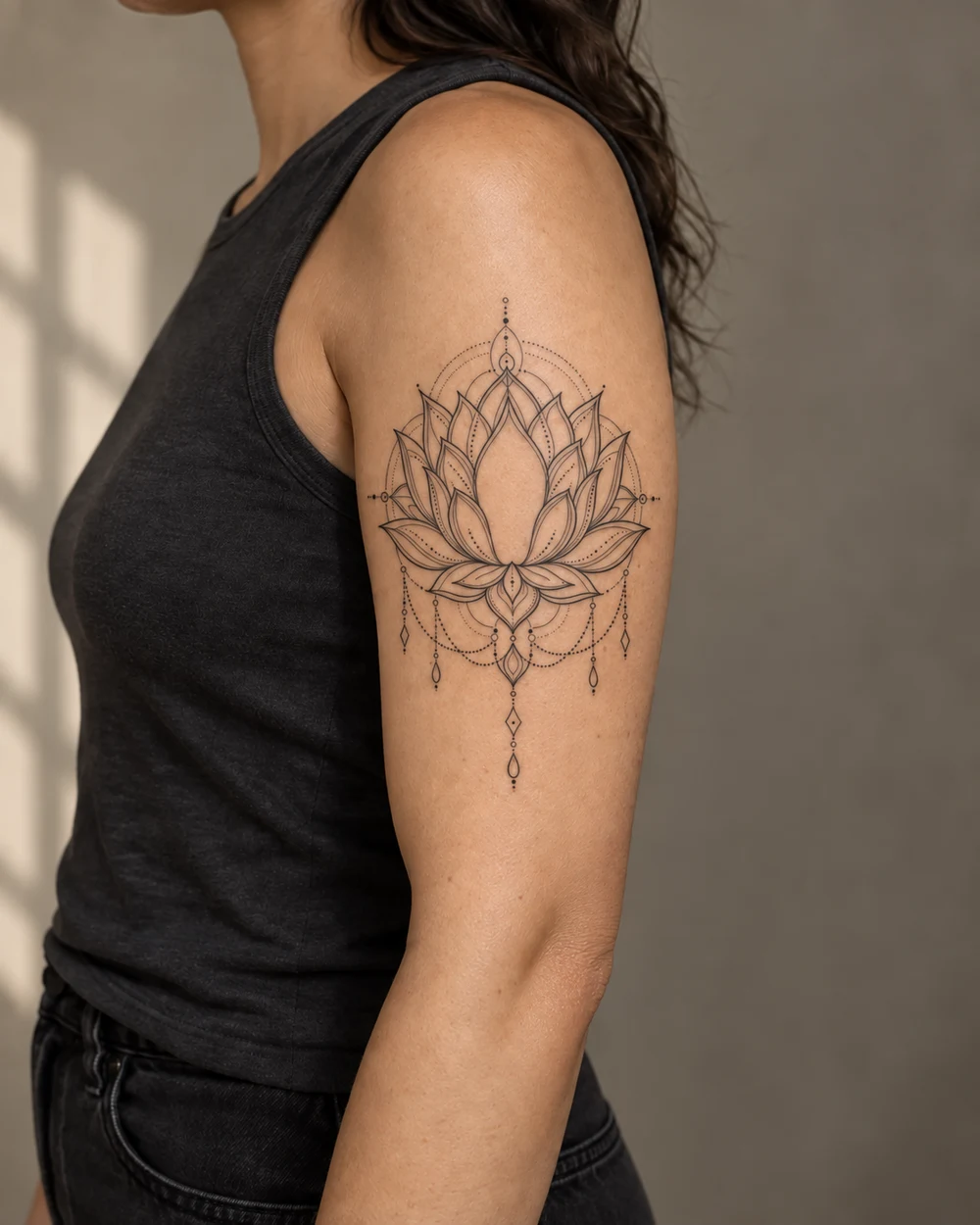
Start with a concept and linework, then adjust position on five site-provided body models for free before generating a final placement preview.
The placement step unlocks after your selected concept has a linework draft to position.
 Private planningNot saved on this device
For planning and artist review only. Results may need cleanup, resizing, redraw or placement changes.
Width, direction, scale, and visual weight change once a tattoo is seen beside a limb or shoulder. A model preview helps you compare those broad choices before an appointment without pretending to simulate your anatomy.
Start with an original idea and keep the composition you want to place.
Use the selected direction so the placement test is tied to one consistent design.
Choose a model, adjust it free, then generate a final blend only when ready.
The preview is designed to compare broad placement, scale, direction, and visual weight. It is not an anatomical simulation.
Positioning adjustments cost 0 credits. A final skin blend for the selected model area uses 4 credits after you have a concept and linework. The complete paid journey is typically 10 credits.
No. TattooPreview AI currently uses site-provided adult body models for upper-arm, forearm, calf, shoulder, and upper-back placement. This gives approximate context without collecting a personal body photo. Your artist must fit the design on your real anatomy before tattooing.
It is accurate enough to compare broad placement, scale, direction, and visual weight, but it is not an anatomical simulation. Camera perspective, body shape, curvature, movement, skin, and wrapping can make the real fitted design look different.
Moving, resizing, rotating, and changing ink density in the positioning guide is free. Creating a final placement preview for the selected body area uses the number of credits displayed in the generator before you confirm it.
The current workflow includes site-provided upper-arm, forearm, calf, shoulder, and adult upper-back model views. These cover common planning scenarios but do not represent every body area or angle. Ask your artist to assess any placement not shown.
No. It cannot assess pain, skin health, allergies, healing, anatomy, or medical risk. Discuss health concerns with an appropriate clinician and discuss placement, procedure, hygiene, and aftercare with a qualified tattoo professional.
Bring the preferred concept, linework draft, placement preview, approximate size, body area, meaning, essential details, and a list of flexible elements. Treat them as conversation materials and expect the artist to redraw and fit the final design.
It serves both planning purposes on site-provided body models: compare approximate position, scale, rotation, and visual weight. It does not show your anatomy or guarantee how the tattoo will look after a real fitting or healing.
Compare the broad scale and direction on a site-provided model, then take the preview to your artist for a real stencil fitting.
Start Placement PlanningAn AI tattoo generator on body models helps you judge how a design might read at an approximate scale and location before a consultation. A standalone image can look balanced on a square canvas but feel too wide, too dense, or pointed in the wrong direction when placed on an arm, shoulder, or calf. Body context makes proportion and visual weight easier to discuss, even though it cannot predict the exact result on an individual person.
TattooPreview AI connects placement to the earlier concept and linework decisions. You begin with an original written idea, choose a generated direction, create stencil-style linework, and then place that selected design on a site-provided adult body model. Scale, rotation, position, and ink density can be adjusted before creating a final placement preview. The same selected version stays connected throughout the workflow, reducing confusion between unrelated mockups.
Choose the body area that is closest to your plan: upper arm, forearm, calf, or shoulder. Move and resize the selected design until the overall shape sits inside the visible placement area. Rotate it only enough to follow the intended direction of the limb or shoulder. Adjusting this live guide is free, so use it to compare several positions before generating a final blend. The paid blend creates one image for the currently selected body area.
Evaluate placement from more than one distance. Up close, check whether key details remain visible and whether the design crosses awkward visual boundaries. From farther away, look at the silhouette and the balance between tattoo and open skin. A good preview should help you ask better questions, such as whether the design should wrap, follow muscle flow, move higher, become narrower, or lose secondary details. Your artist must answer those questions using your actual anatomy.
Size is not only a measurement; it determines how much information a tattoo can carry. A small fine-line piece needs open spacing and a limited number of interior marks. A medium illustrative design can support more form, while bold blackwork needs enough surrounding skin to keep the silhouette intentional. Use the placement preview to compare relative impact. Ask whether you want the tattoo to read as a quiet detail, a clear focal point, or part of a larger future composition.
The model is an approximate reference, so do not treat an on-screen percentage as a precise centimeter measurement on your body. Record the approximate height you prefer and bring that range to the appointment. An artist can print or draw multiple sizes and hold them against the intended area. That real-world fitting step is essential because screen dimensions, camera perspective, limb circumference, posture, and body shape all affect perceived scale.
Direction changes how a tattoo interacts with movement. An animal profile may face inward or outward; a botanical stem may rise with the limb or curve around it; an ornamental design may center on a visible landmark. Rotate the mockup to explore these choices, but avoid assuming that a flat overlay represents the way a design will wrap. Curved anatomy can compress one side, open another, or change how the piece reads from different angles.
Use placement notes to capture intent rather than coordinates. Phrases such as centered on the outer forearm, vertical with the flower opening toward the elbow, or slightly forward on the upper arm are more useful than trying to reproduce exact pixels. Include whether the design should be visible in a neutral stance, easy to cover, aligned with an existing tattoo, or positioned with future additions in mind. These practical preferences guide the artist's fitting process.
Forearm placements are highly visible and often favor vertical or gently flowing compositions. Upper-arm areas can support broader shapes and may connect well with future shoulder or sleeve work. Calf placements offer a long surface but change visually as the leg turns. Shoulder placements can complement a rounded form, yet a flat preview cannot show the full wrap. The model views help compare broad directions; they do not replace an in-person stencil fitting.
Before deciding, consider visibility, clothing, work requirements, sun exposure, existing scars or tattoos, and whether the design should stand alone or become part of a larger project. Pain, healing, skin condition, and medical concerns cannot be evaluated by an AI tattoo generator on body imagery. Discuss those topics with qualified professionals. A useful digital preview focuses on composition and communication, leaving health and procedure decisions outside the software.
A final placement preview should be reviewed for overall position and scale, not photographic perfection. Image generation can change edges, shading, line density, skin texture, or small design details. Compare the preview with the selected linework and identify any differences. If a symbol changed, a line disappeared, or the design became darker than intended, keep the original linework as the source of truth and treat the placement image only as a visualization.
Check three things: whether the position supports the body's general direction, whether the scale preserves readability, and whether the visual weight matches your preference. Do not use the blend to judge exact ink color, healed appearance, aging, or skin response. It is also not evidence that the tattoo can be executed exactly as shown. The strongest result is one that helps you explain your preference and invite informed changes from your artist.
Bring the selected concept, the stencil-style draft, one or two placement previews, and a short written brief. State the approximate size range, preferred body area, desired visibility, and the features that matter most. If you are uncertain between two positions, say why each appeals to you. An artist can then assess the design against anatomy, movement, existing work, and the technical needs of the chosen style instead of guessing from a single mockup.
Expect the artist to reposition, resize, rotate, simplify, or redraw the design. During a stencil fitting, move naturally and view the placement in a mirror from several angles. Take time before approving a permanent location. Digital preparation can make that appointment more focused, but consent belongs to the real fitting. You should feel comfortable asking for another size or position before tattooing begins.
This placement workflow uses site-provided, AI-generated adult body-model photos. It does not require or accept your personal body photo for placement. That design reduces the need to share identifiable imagery while still giving useful context for broad scale and position decisions. Because the model is not your body, the preview cannot account for your exact proportions, skin tone, scars, muscle movement, existing tattoos, or the way a design wraps around you.
Generated concepts and placement blends are planning references. Keep prompts original and avoid unauthorized likenesses, protected artwork, brand marks, and exact living-artist style requests. Review all imagery for unexpected changes or artifacts. TattooPreview AI does not provide medical or tattooing advice. Choose a reputable professional, follow studio aftercare guidance, and check local age, consent, and licensing requirements before making any permanent decision.